
Hotfunnels
Hotfunnel
Hotfunnel
Hotfunnel
Scaling SMEs through automations
Scaling SMEs Through Smarter Payment Management
Scaling SMEs Through Smarter Payment Management
Designing a payment automation platform for Nigerian small businesses who were running serious operations on scattered, disconnected tools. A 0→1 fintech product that gave Nigerian merchants a single place to collect payments, automate follow-ups, manage customers, and connect the tools they were already using.
Designing a payment automation platform for Nigerian small businesses who were running serious operations on scattered, disconnected tools. A 0→1 fintech product that gave Nigerian merchants a single place to collect payments, automate follow-ups, manage customers, and connect the tools they were already using.
Client
Hotfunnel
Industry
Fintech, B2B Saas
Platforms
Web app, Mobile app
Role
Product designer
Year
2025
Outcome
Outcome
Full product design across multi-account dashboard, transaction management, payment links, invoice creation, business portfolios, and online storefronts
Full product design across multi-account dashboard, transaction management, payment links, invoice creation, business portfolios, and online storefronts

Context & Opportunity
Context & Opportunity
Small and medium-sized businesses in Nigeria are not short of payment options. They have bank accounts, often more than one. They have POS terminals. They have mobile money. They accept transfers. They receive payments through multiple channels every single day.
The problem is that none of those channels talk to each other.
A business owner running even a modest operation might be checking three or four bank apps to piece together how much came in today, which orders have been paid, which invoices are still outstanding, and whether their cash flow is actually healthy or just looks that way on one account. That's not a tools problem. That's a visibility problem. And for a small business where every naira of working capital matters, not having that visibility creates real consequences.
Hot funnel was built around that gap, a single platform where merchants and vendors could connect all their accounts and payment channels, see everything in one dashboard, and run their day-to-day finances without having to switch between five different apps to do it.
Small and medium-sized businesses in Nigeria are not short of payment options. They have bank accounts, often more than one. They have POS terminals. They have mobile money. They accept transfers. They receive payments through multiple channels every single day.
The problem is that none of those channels talk to each other.
A business owner running even a modest operation might be checking three or four bank apps to piece together how much came in today, which orders have been paid, which invoices are still outstanding, and whether their cash flow is actually healthy or just looks that way on one account. That's not a tools problem. That's a visibility problem. And for a small business where every naira of working capital matters, not having that visibility creates real consequences.
Hot funnel was built around that gap, a single platform where merchants and vendors could connect all their accounts and payment channels, see everything in one dashboard, and run their day-to-day finances without having to switch between five different apps to do it.
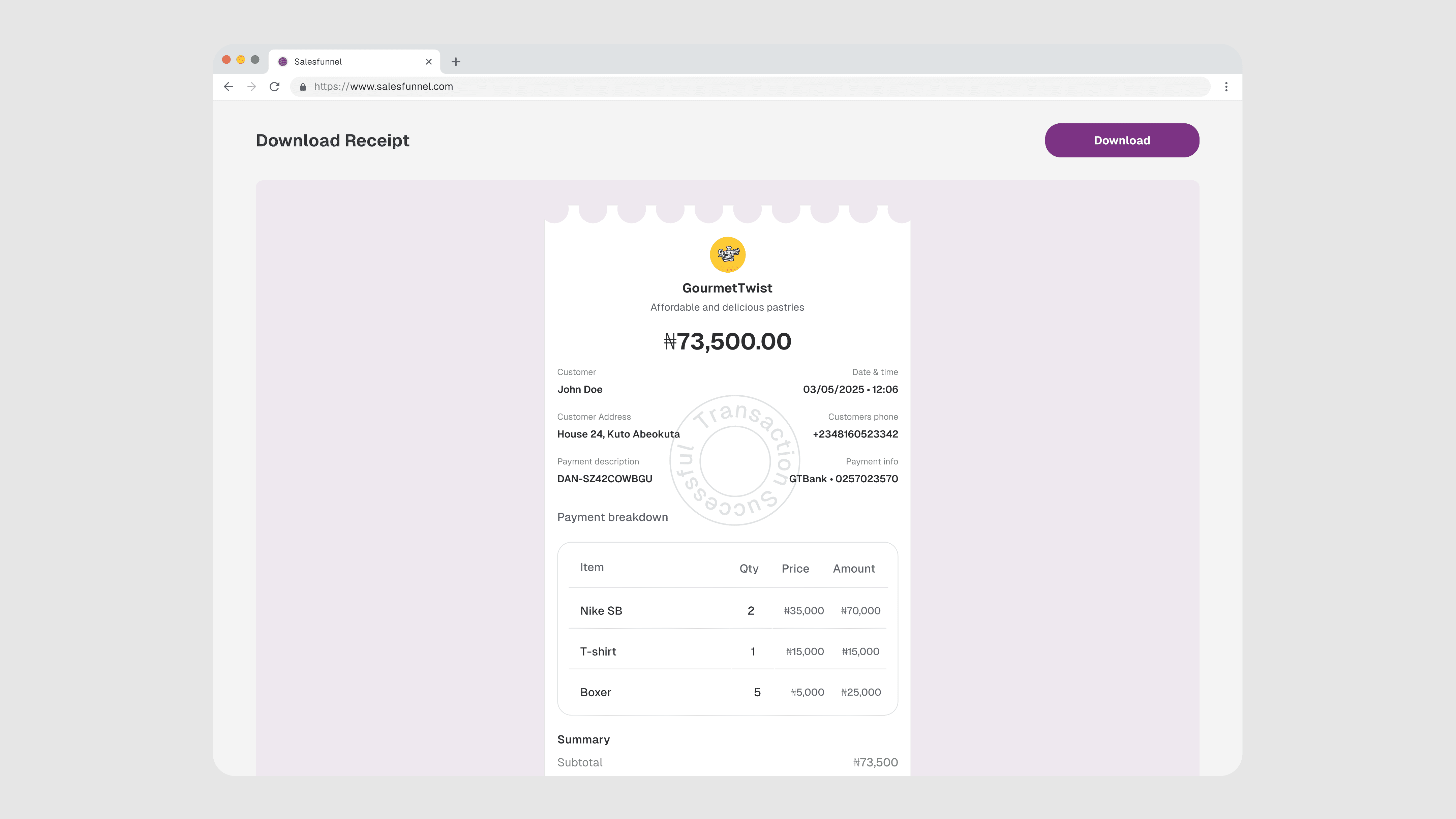
Download receipt
Download receipt
The Business Problem, Not the UX Problem
The Business Problem, Not the UX Problem
Most fintech case studies lead with the user. This one starts with the merchant. A small business owner in Lagos running a wholesale operation might have a GTBank account for supplier payments, a Opay account customers prefer, a POS terminal through Access Bank, and a personal account they shouldn't be using for business but are. Every morning, they open four apps to piece together yesterday's numbers. They do this before they open their shop. They do it again at the end of the day. They do it whenever a customer calls to say "I've paid" and they need to verify. This isn't a lack of financial literacy. It's a structural gap that the existing tools weren't built to close. Banks don't consolidate across other banks. POS terminals don't talk to mobile wallets. Reconciliation stays a manual, time-consuming habit. Salesfunnel was built to close that gap, one dashboard that pulled all of it together. My job was to design an experience that actually delivered on that promise. Not just technically possible, but genuinely usable for someone managing a real business under real pressure.
Most fintech case studies lead with the user. This one starts with the merchant. A small business owner in Lagos running a wholesale operation might have a GTBank account for supplier payments, a Opay account customers prefer, a POS terminal through Access Bank, and a personal account they shouldn't be using for business but are.
Every morning, they open four apps to piece together yesterday's numbers. They do this before they open their shop. They do it again at the end of the day. They do it whenever a customer calls to say "I've paid" and they need to verify. This isn't a lack of financial literacy. It's a structural gap that the existing tools weren't built to close. Banks don't consolidate across other banks. POS terminals don't talk to mobile wallets.
Reconciliation stays a manual, time-consuming habit. Salesfunnel was built to close that gap, one dashboard that pulled all of it together. My job was to design an experience that actually delivered on that promise. Not just technically possible, but genuinely usable for someone managing a real business under real pressure.

Sign up
Sign up
Understanding the Operating Reality
Understanding the Operating Reality
Before any wireframe, I needed to understand what running a small business in this context genuinely looks like day-to-day. The merchants Hot Funnel was built for aren't running single-channel operations. A fashion retailer might be selling on Instagram, accepting bank transfers, following up by WhatsApp, and manually updating a spreadsheet of who's paid and who hasn't, all before noon. A wholesale distributor might be managing dozens of recurring customers, sending invoices by email, and manually reconciling payments across two or three bank accounts at the end of each week. The operational burden is real, and it's largely invisible in the data. What shows up in analytics as a "missed payment" or "churned customer" often started three steps earlier, a follow-up that didn't happen, a confirmation that arrived too late, a campaign that was never sent because there was no simple way to send it.
Before any wireframe, I needed to understand what running a small business in this context genuinely looks like day-to-day.
The merchants Hot Funnel was built for aren't running single-channel operations. A fashion retailer might be selling on Instagram, accepting bank transfers, following up by WhatsApp, and manually updating a spreadsheet of who's paid and who hasn't all before noon. A wholesale distributor might be managing dozens of recurring customers, sending invoices by email, and manually reconciling payments across two or three bank accounts at the end of each week.
The operational burden is real, and it's largely invisible in the data. What shows up in analytics as a "missed payment" or "churned customer" often started three steps earlier, a follow-up that didn't happen, a confirmation that arrived too late, a campaign that was never sent because there was no simple way to send it.
Three things anchored my design thinking throughout this project:


Three things anchored my design thinking throughout this project:
Manual effort is the competitor. Hot Funnel wasn't competing with another fintech platform. It was competing with the merchant's existing habits, their phone, their spreadsheet, their WhatsApp broadcast list. The platform had to be demonstrably less effort than what they were already doing, or they'd revert.
Automation only has value if merchants trust it. Telling a business owner that the platform will automatically send a reminder when an invoice goes unpaid is a powerful promise. But if they don't understand what was sent, when, and to whom, that automation becomes anxiety-inducing, not helpful. Visibility into every automated action was non-negotiable.
Connections are where the real value lives. A payment link on its own is useful. A payment link that, when paid, automatically updates a Google Sheet, sends a WhatsApp confirmation, and tags the customer in the CRM, that's a fundamentally different product. I kept that end-state in mind when designing even the simplest surfaces.
Three things anchored my design thinking throughout this project:
Manual effort is the competitor. Hot Funnel wasn't competing with another fintech platform. It was competing with the merchant's existing habits, their phone, their spreadsheet, their WhatsApp broadcast list. The platform had to be demonstrably less effort than what they were already doing, or they'd revert.
Automation only has value if merchants trust it. Telling a business owner that the platform will automatically send a reminder when an invoice goes unpaid is a powerful promise. But if they don't understand what was sent, when, and to whom, that automation becomes anxiety-inducing, not helpful. Visibility into every automated action was non-negotiable.
Connections are where the real value lives. A payment link on its own is useful. A payment link that, when paid, automatically updates a Google Sheet, sends a WhatsApp confirmation, and tags the customer in the CRM, that's a fundamentally different product. I kept that end-state in mind when designing even the simplest surfaces.
What I Built
1. The Dashboard
The dashboard was where I made my first big structural decision: this couldn't be a traditional analytics home screen.
Merchants checking in between customers don't need charts. They need answers. Has anything been paid? Is anything overdue? What needs my attention right now?
I designed the dashboard around operational status, not data visualization. Total balance across connected accounts and wallets. Recent payment activity, confirmed, pending, failed, surfaced immediately. Outstanding invoices. Upcoming recurring billing. A snapshot of recent campaign performance. Everything actionable, nothing decorative.
The sidebar navigation reflected the same logic. I organized it around what merchants needed to do, collect, send, manage, automate, rather than what the features were called internally. The goal was that a merchant could open the platform with a specific task in mind and reach the right place in two taps.
1. The Dashboard
The dashboard was where I made my first big structural decision: this couldn't be a traditional analytics home screen.
Merchants checking in between customers don't need charts. They need answers. Has anything been paid? Is anything overdue? What needs my attention right now?
I designed the dashboard around operational status, not data visualization. Total balance across connected accounts and wallets. Recent payment activity, confirmed, pending, failed, surfaced immediately. Outstanding invoices. Upcoming recurring billing. A snapshot of recent campaign performance. Everything actionable, nothing decorative.
The sidebar navigation reflected the same logic. I organized it around what merchants needed to do, collect, send, manage, automate, rather than what the features were called internally. The goal was that a merchant could open the platform with a specific task in mind and reach the right place in two taps.

Overview Dashboard
Overview Dashboard

Transactions
Transactions
2. Bank Connections & Email Listening
This was technically the most complex surface to design for, and the one that made everything else possible.
Merchants connect their bank accounts to Hot Funnel and critically, the email addresses associated with those accounts. Hot Funnel then listens to incoming payment notification emails in real time. When a payment hits, the platform detects it, matches it to an invoice or customer record where possible, and triggers whatever automated actions the merchant has configured.
The design challenge here was trust. Connecting your bank's notification email to a third-party platform is an ask with real psychological weight. Merchants needed to understand exactly what Hot Funnel could see, what it couldn't, and what it would do with that access.
I designed the connection flow to be explicit at every step, permissions stated plainly, not buried in fine print. I used plain language instead of technical OAuth terminology. And I built a "connected accounts" view that showed, at any time, every account linked and every email listener active, so merchants always knew what was connected and could revoke access in one tap.
2. Bank Connections & Email Listening
This was technically the most complex surface to design for, and the one that made everything else possible.
Merchants connect their bank accounts to Hot Funnel and critically, the email addresses associated with those accounts. Hot Funnel then listens to incoming payment notification emails in real time. When a payment hits, the platform detects it, matches it to an invoice or customer record where possible, and triggers whatever automated actions the merchant has configured.
The design challenge here was trust. Connecting your bank's notification email to a third-party platform is an ask with real psychological weight. Merchants needed to understand exactly what Hot Funnel could see, what it couldn't, and what it would do with that access.
I designed the connection flow to be explicit at every step, permissions stated plainly, not buried in fine print. I used plain language instead of technical OAuth terminology. And I built a "connected accounts" view that showed, at any time, every account linked and every email listener active, so merchants always knew what was connected and could revoke access in one tap.


Connecting bank
Connecting bank

Connected bank
Connected bank
3. Invoicing & Payment Collection
Invoicing and payment collection aren't two separate workflows on Hot Funnel, they're the same action with different delivery options at the end.
A merchant creates an invoice: customer details, line items, amounts, due dates, payment terms. Once it's built, they decide how to send it. They can share it as a payment link the customer taps to pay directly, send it to the customer's email from within the platform, or download it as a PDF to attach wherever they need. Same invoice, three delivery paths, one creation flow.
That design decision mattered more than it might seem. The alternative was separate tools for "invoices" and "payment links" that would have forced merchants to construct the same information twice depending on how a customer preferred to pay. That's exactly the kind of redundant effort Hot Funnel was supposed to eliminate.
3. Invoicing & Payment Collection
Invoicing and payment collection aren't two separate workflows on Hot Funnel, they're the same action with different delivery options at the end.
A merchant creates an invoice: customer details, line items, amounts, due dates, payment terms. Once it's built, they decide how to send it. They can share it as a payment link the customer taps to pay directly, send it to the customer's email from within the platform, or download it as a PDF to attach wherever they need. Same invoice, three delivery paths, one creation flow.
That design decision mattered more than it might seem. The alternative was separate tools for "invoices" and "payment links" that would have forced merchants to construct the same information twice depending on how a customer preferred to pay. That's exactly the kind of redundant effort Hot Funnel was supposed to eliminate.

Invoice
Invoice

Edit invoice
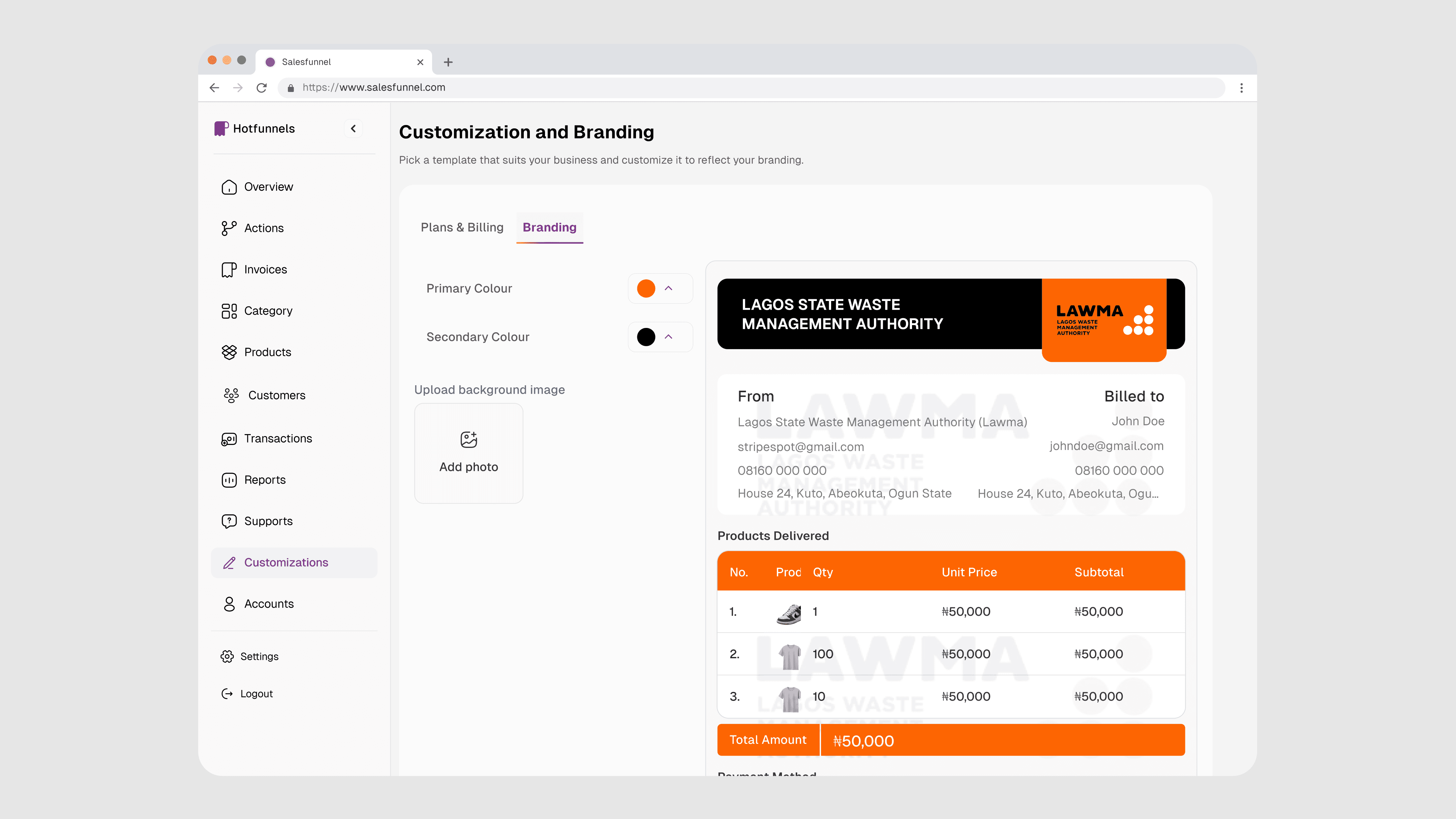
The customer-facing payment page that a link opens received significant attention. For many of Hot Funnel's merchants, this is the most professional digital touchpoint their customers encounter from them. It needed to feel trustworthy and on-brand — not a generic payment gateway. Merchants control what appears on the page: their business name, logo, invoice details. It reflects their business, not the platform.
The customer-facing payment page that a link opens received significant attention. For many of Hot Funnel's merchants, this is the most professional digital touchpoint their customers encounter from them. It needed to feel trustworthy and on-brand — not a generic payment gateway. Merchants control what appears on the page: their business name, logo, invoice details. It reflects their business, not the platform.

customer-facing payment page
customer-facing payment page

Customized Invoice By Vendor
Customized Invoice By Vendor
Beyond single invoices, the scope expanded in two directions.
Bulk invoicing addressed the question of how a merchant sends the same invoice to fifty customers without it becoming a data entry exercise. I designed this around customer groups and product selections, merchants target a segment, attach a product or service, and the platform generates individual invoices for each recipient without the merchant building them one by one.
Beyond single invoices, the scope expanded in two directions.
Bulk invoicing addressed the question of how a merchant sends the same invoice to fifty customers without it becoming a data entry exercise. I designed this around customer groups and product selections, merchants target a segment, attach a product or service, and the platform generates individual invoices for each recipient without the merchant building them one by one.

Creating Single Invoice
Creating Single Invoice

Creating Bulk invoices
Creating Bulk invoices

Adding Line Items
Adding Line Items
Recurring invoices handled the scheduling problem. A merchant sets the cadence, weekly, monthly, on a specific date, and Hot Funnel issues each subsequent invoice automatically, sends it through whichever delivery method the merchant has set, and tracks payment status across the full series. The recurring log was designed to make the history easy to scan: what went out, when, and what's been paid versus what's still outstanding.
Across all three types, overdue invoices surface themselves. Merchants don't have to remember to chase, the platform holds that state and makes it visible.
Recurring invoices handled the scheduling problem. A merchant sets the cadence, weekly, monthly, on a specific date, and Hot Funnel issues each subsequent invoice automatically, sends it through whichever delivery method the merchant has set, and tracks payment status across the full series. The recurring log was designed to make the history easy to scan: what went out, when, and what's been paid versus what's still outstanding.
Across all three types, overdue invoices surface themselves. Merchants don't have to remember to chase, the platform holds that state and makes it visible.

Recurring Invoice
Recurring Invoice

Creating Recurring invoices
Creating Recurring invoices

Editing invoice
Editing invoice

View details
View details

Invoice & Payment Link
Invoice & Payment Link
4. Campaigns
This was the feature that most surprised merchants during testing, not because it was unexpected, but because they hadn't connected the idea of a payment platform with the ability to run customer campaigns.
Hot Funnel lets merchants create and send campaigns across email, SMS, and WhatsApp to their customer list. The use cases are immediate and practical: a restock announcement, a promotion for recurring customers, a payment reminder for everyone with an outstanding invoice, a follow-up sequence after a sale.
I designed the campaign builder to be channel-flexible and audience-precise. Merchants select their channel, write their message, and target a specific segment of their customer list, all customers, customers with unpaid invoices, customers who purchased in the last thirty days, or a manual selection. They schedule the send or fire it immediately, and the campaign report shows delivery and response.
The key design decision here was connecting campaigns to customer records. When a campaign sends, the activity appears in the customer's profile. When a customer responds or pays after a campaign touchpoint, that's visible too. Campaigns aren't a broadcast tool bolted onto a payment platform — they're part of the same customer relationship.
4. Campaigns
This was the feature that most surprised merchants during testing, not because it was unexpected, but because they hadn't connected the idea of a payment platform with the ability to run customer campaigns.
Hot Funnel lets merchants create and send campaigns across email, SMS, and WhatsApp to their customer list. The use cases are immediate and practical: a restock announcement, a promotion for recurring customers, a payment reminder for everyone with an outstanding invoice, a follow-up sequence after a sale.
I designed the campaign builder to be channel-flexible and audience-precise. Merchants select their channel, write their message, and target a specific segment of their customer list, all customers, customers with unpaid invoices, customers who purchased in the last thirty days, or a manual selection. They schedule the send or fire it immediately, and the campaign report shows delivery and response.
The key design decision here was connecting campaigns to customer records. When a campaign sends, the activity appears in the customer's profile. When a customer responds or pays after a campaign touchpoint, that's visible too. Campaigns aren't a broadcast tool bolted onto a payment platform, they're part of the same customer relationship.

Campaigns
Campaigns

Create Campagins
Create Campagins
5. Customer Management
Every payment, invoice, campaign, and interaction in Hot Funnel ties back to a customer record.
I designed the customer profile to be a complete operational view: contact details, payment history, invoice history, campaign touchpoints, notes. A merchant dealing with a customer query could open their profile and have the full picture in front of them without switching apps or scrolling through WhatsApp.
Customers can be added manually, imported, or created automatically when a payment link is used for the first time. I made sure the automatic creation path worked cleanly — merchants shouldn't have to do administrative work to maintain their customer list. The list should build itself as business happens.
5. Customer Management
Every payment, invoice, campaign, and interaction in Hot Funnel ties back to a customer record.
I designed the customer profile to be a complete operational view: contact details, payment history, invoice history, campaign touchpoints, notes. A merchant dealing with a customer query could open their profile and have the full picture in front of them without switching apps or scrolling through WhatsApp.
Customers can be added manually, imported, or created automatically when a payment link is used for the first time. I made sure the automatic creation path worked cleanly — merchants shouldn't have to do administrative work to maintain their customer list. The list should build itself as business happens.

Customers
Customers

Edit Customers Details
Edit Customers Details
6. Product Catalog
Merchants can build a catalog of their products and services inside Hot Funnel, which then connects to payment links, invoices, and the storefront.
The catalog design was deliberate in its simplicity. Name, description, price, image, availability. No inventory complexity, simple variant management, nothing beyond what a small business actually needs. The catalog exists to make creating payment links and invoices faster, selecting a product autofills the details rather than re-entering them every time
6. Product Catalog
Merchants can build a catalog of their products and services inside Hot Funnel, which then connects to payment links, invoices, and the storefront.
The catalog design was deliberate in its simplicity. Name, description, price, image, availability. No inventory complexity, simple variant management, nothing beyond what a small business actually needs. The catalog exists to make creating payment links and invoices faster, selecting a product autofills the details rather than re-entering them every time

Customers
Customers

Add Product Components
Add Product Components

What Customers See
What Customers See
7. Automation, Triggers & Integrations
This was the most architecturally complex part of the product to design, and the part I spent the most time thinking through before a single screen was sketched.
The core idea: merchants connect the tools they already use, WhatsApp, email, SMS, Google Sheets, webhooks and define what happens on each of them when a payment event fires. Payment received → send a WhatsApp confirmation to the customer. Invoice paid → update a Google Sheet row. Recurring invoice generated → notify the merchant by SMS. New payment received via link → log it to a webhook with the invoice reference attached.
The integrations and the automations aren't separate features. The integrations are the actions. You connect a service once, authenticate it in the connections panel and it becomes available everywhere in the automation builder. There's no toggling between an "integrations" section and an "automations" section. They're the same surface, designed to work as one.
What made this hard to design wasn't the trigger-action logic itself, that's relatively straightforward to model. The hard part was making it feel manageable for a merchant who has never configured automation in their life. The "When X, do Y" framing was deliberate. Plain language over technical syntax. Merchants select a trigger from a defined list, choose an action channel, write the message or specify the output with variables like invoice reference, customer name, and payment amount available to insert inline and save.
Webhook support was important for merchants running more technical setups. Developers managing backend systems could receive structured, real-time payment events from Hot Funnel complete with invoice references, and handle them however their system required. I made sure the webhook configuration was accessible without being buried, it lived alongside WhatsApp and SMS as an equal action option, not in a separate developer section.
The active automations view shows every rule currently running, the last time each one fired, and the option to pause or edit without deleting. That last detail mattered. Merchants needed to trust this system, and trust requires visibility, a merchant should never be in a position where they don't know what Hot Funnel has sent on their behalf. Making every automation auditable, at a glance, was a non-negotiable part of the design.
7. Automation, Triggers & Integrations
This was the most architecturally complex part of the product to design, and the part I spent the most time thinking through before a single screen was sketched.
The core idea: merchants connect the tools they already use, WhatsApp, email, SMS, Google Sheets, webhooks and define what happens on each of them when a payment event fires. Payment received → send a WhatsApp confirmation to the customer. Invoice paid → update a Google Sheet row. Recurring invoice generated → notify the merchant by SMS. New payment received via link → log it to a webhook with the invoice reference attached.
The integrations and the automations aren't separate features. The integrations are the actions. You connect a service once, authenticate it in the connections panel and it becomes available everywhere in the automation builder. There's no toggling between an "integrations" section and an "automations" section. They're the same surface, designed to work as one.
What made this hard to design wasn't the trigger-action logic itself, that's relatively straightforward to model. The hard part was making it feel manageable for a merchant who has never configured automation in their life. The "When X, do Y" framing was deliberate. Plain language over technical syntax. Merchants select a trigger from a defined list, choose an action channel, write the message or specify the output with variables like invoice reference, customer name, and payment amount available to insert inline and save.
Webhook support was important for merchants running more technical setups. Developers managing backend systems could receive structured, real-time payment events from Hot Funnel complete with invoice references, and handle them however their system required. I made sure the webhook configuration was accessible without being buried, it lived alongside WhatsApp and SMS as an equal action option, not in a separate developer section.
The active automations view shows every rule currently running, the last time each one fired, and the option to pause or edit without deleting. That last detail mattered. Merchants needed to trust this system, and trust requires visibility, a merchant should never be in a position where they don't know what Hot Funnel has sent on their behalf. Making every automation auditable, at a glance, was a non-negotiable part of the design.

Automated Actions
Automated Actions

Invoice Reference
Invoice Reference

Add actions components
Add actions components
Testing & What Changed
I ran structured usability testing across two rounds with small business owners covering wholesale, fashion, food, and service businesses.
The first round surfaced three meaningful issues.
The automation builder was causing hesitation. Merchants understood the concept but weren't confident they'd set up the logic correctly, they were worried about triggering the wrong action and sending something they hadn't intended. I redesigned the confirmation step to show a full plain-language summary of the rule before saving: "When a payment is received, you will send a WhatsApp message to [customer] saying [message preview]." That preview eliminated the uncertainty.
The bank connection flow felt abrupt. Merchants were being asked to connect a sensitive account before they'd experienced enough of the product to trust it. I restructured onboarding to let merchants explore the dashboard, create a payment link, and send a test invoice before the connection prompt appeared. By the time they reached it, they'd already got value from the platform.
By the second round, both the hesitation and the confusion had cleared. Merchants were completing core flows without prompting and asking questions that were about use cases, not about how to use the product. That's the signal I was looking for
Testing & What Changed
I ran structured usability testing across two rounds with small business owners covering wholesale, fashion, food, and service businesses.
The first round surfaced three meaningful issues.
The automation builder was causing hesitation. Merchants understood the concept but weren't confident they'd set up the logic correctly, they were worried about triggering the wrong action and sending something they hadn't intended. I redesigned the confirmation step to show a full plain-language summary of the rule before saving: "When a payment is received, you will send a WhatsApp message to [customer] saying [message preview]." That preview eliminated the uncertainty.
The bank connection flow felt abrupt. Merchants were being asked to connect a sensitive account before they'd experienced enough of the product to trust it. I restructured onboarding to let merchants explore the dashboard, create a payment link, and send a test invoice before the connection prompt appeared. By the time they reached it, they'd already got value from the platform.
By the second round, both the hesitation and the confusion had cleared. Merchants were completing core flows without prompting and asking questions that were about use cases, not about how to use the product. That's the signal I was looking for
Automated Actions
Automated Actions
Invoice Reference
Invoice Reference
Add actions components
Add actions components
Selected Screens
Selected Screens
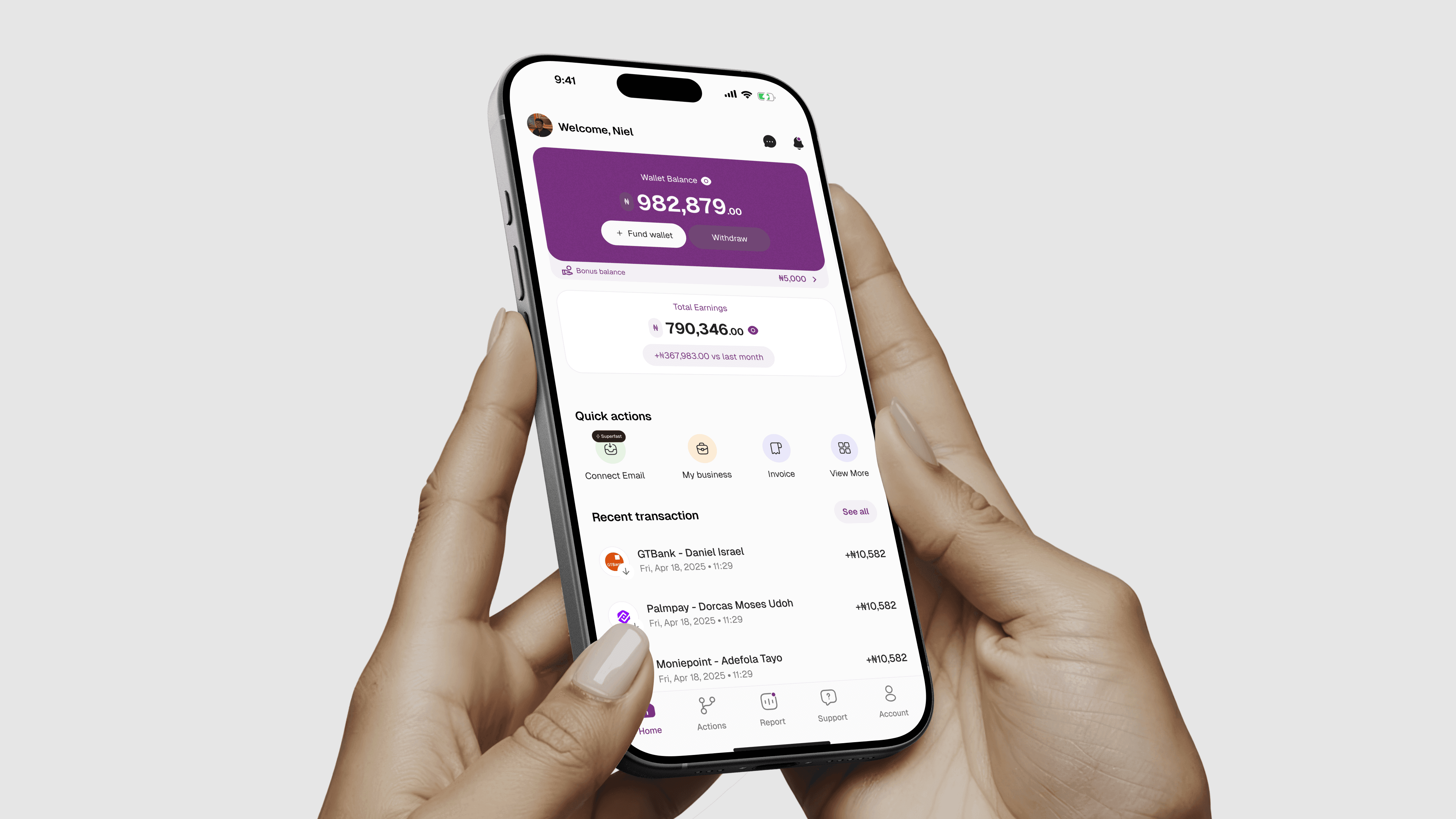
The sections above cover the thinking. Here's a look at where it landed visually.
The designs span both the web app and the mobile application, the mobile version mirrors the core merchant workflows but is built for the on-the-go reality of how most of these businesses actually operate. Checking a payment confirmation between customers, sending a quick invoice, reviewing what an automation just fired, these are phone moments, not desk moments.
The screens below represent a cross-section of the product: the dashboard, invoicing, automation builder, campaign creation, customer profiles, and key mobile views. Not every flow is shown here, the goal isn't documentation, it's a sense of the visual language, the information hierarchy, and how the product holds together across surfaces.
The sections above cover the thinking. Here's a look at where it landed visually.
The designs span both the web app and the mobile application, the mobile version mirrors the core merchant workflows but is built for the on-the-go reality of how most of these businesses actually operate. Checking a payment confirmation between customers, sending a quick invoice, reviewing what an automation just fired, these are phone moments, not desk moments.
The screens below represent a cross-section of the product: the dashboard, invoicing, automation builder, campaign creation, customer profiles, and key mobile views. Not every flow is shown here, the goal isn't documentation, it's a sense of the visual language, the information hierarchy, and how the product holds together across surfaces.




What Building This From Zero Taught Me:
Designing a 0→1 product is a different discipline from redesigning an existing one. With a redesign, the product's logic is already established, your job is to make it clearer, faster, or more honest. With a blank canvas, you're establishing the logic itself, and every decision you defer comes back later.
The automation system was where I felt that most acutely. I could have designed automation as a simple feature, one trigger, one action, basic templating. It would have shipped faster and been easier to explain. But that version wouldn't have been the product merchants needed. It would have been a demo of an idea.
Taking the time to design automation as a proper system, with a clear builder, full action composability, visibility into what's running, and integration into every other part of the product, made Hot Funnel coherent in a way a simpler version couldn't have been. Everything connects to everything else. That's not a feature. That's the product.
The other thing 0→1 work requires is ruthlessness about what you're not building yet. Hot Funnel has a clear scope for its first version, and there are things that didn't make it in, more advanced analytics, a richer storefront. Those aren't failures. They're sequencing decisions. Knowing what to leave for later, and designing the current version in a way that doesn't foreclose those additions, is part of the craft.
What Building This From Zero Taught Me:
Designing a 0→1 product is a different discipline from redesigning an existing one. With a redesign, the product's logic is already established, your job is to make it clearer, faster, or more honest. With a blank canvas, you're establishing the logic itself, and every decision you defer comes back later.
The automation system was where I felt that most acutely. I could have designed automation as a simple feature, one trigger, one action, basic templating. It would have shipped faster and been easier to explain. But that version wouldn't have been the product merchants needed. It would have been a demo of an idea.
Taking the time to design automation as a proper system, with a clear builder, full action composability, visibility into what's running, and integration into every other part of the product, made Hot Funnel coherent in a way a simpler version couldn't have been. Everything connects to everything else. That's not a feature. That's the product.
The other thing 0→1 work requires is ruthlessness about what you're not building yet. Hot Funnel has a clear scope for its first version, and there are things that didn't make it in, more advanced analytics, a richer storefront. Those aren't failures. They're sequencing decisions. Knowing what to leave for later, and designing the current version in a way that doesn't foreclose those additions, is part of the craft.


Available for new projects
Ready to start?
Let's chat.